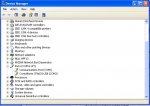
yes its com 3. If it wasn't set to the right com then the wintest and lcd smartie wouldn't see it either.
Looking for additional LCD resources? Check out our LCD blog for the latest developments in LCD technology.
Private Sub Button1_Click(ByVal sender As System.Object, ByVal e As System.EventArgs) Handles Button1.Click
If sp.IsOpen = False Then
sp.PortName = "COM1"
sp.Open()
End If
Dim blob(6) As Byte 'array longer than necessary, who cares
blob(0) = 6
blob(1) = 0
blob(2) = &H97
blob(3) = &H5B
sp.Write(blob, 0, blob.Length)
End Sub
Public Sub Receive_data() Handles sp.DataReceived
Dim incoming(sp.ReadBufferSize) As Byte
sp.Read(incoming, 0, sp.ReadBufferSize)
End Sub
Private Sub Button1_Click(ByVal sender As System.Object, ByVal e As System.EventArgs) Handles Button1.Click
If sp.IsOpen = False Then
sp.PortName = "COM1"
sp.Open()
End If
Dim crc As WORD
Dim blob(19) As Byte 'array longer than necessary, who cares
blob(0) = 7
blob(1) = 16
blob(2) = Asc("a")
blob(3) = Asc(" ")
blob(4) = Asc(" ")
blob(5) = Asc(" ")
blob(6) = Asc(" ")
blob(7) = Asc(" ")
blob(8) = Asc(" ")
blob(9) = Asc(" ")
blob(10) = Asc(" ")
blob(11) = Asc(" ")
blob(12) = Asc(" ")
blob(13) = Asc(" ")
blob(14) = Asc(" ")
blob(15) = Asc(" ")
blob(16) = Asc(" ")
blob(17) = Asc(" ")
crc = Get_Crc(blob, blob.Length)
blob(18) = crc.Lo
blob(19) = crc.Hi
sp.Write(blob, 0, blob.Length)
End Sub
Public Sub Receive_data() Handles sp.DataReceived
Dim incoming(sp.ReadBufferSize) As Byte
sp.Read(incoming, 0, sp.ReadBufferSize)
End Sub
blob(0) = 7
blob(1) = 1
blob(2) = 6
Private Sub Button1_Click(ByVal sender As System.Object, ByVal e As System.EventArgs) Handles Button1.Click
If sp.IsOpen = False Then
sp.PortName = "COM1"
sp.Open()
End If
Dim crc As WORD
Dim blob(20) As Byte
blob(0) = 7
blob(1) = 1
blob(2) = 6
blob(3) = Asc("a")
blob(4) = Asc(" ")
blob(5) = Asc(" ")
blob(6) = Asc(" ")
blob(7) = Asc(" ")
blob(8) = Asc(" ")
blob(9) = Asc(" ")
blob(10) = Asc(" ")
blob(11) = Asc(" ")
blob(12) = Asc(" ")
blob(13) = Asc(" ")
blob(14) = Asc(" ")
blob(15) = Asc(" ")
blob(16) = Asc(" ")
blob(17) = Asc(" ")
blob(18) = Asc(" ")
crc = Get_Crc(blob, blob.Length)
blob(19) = crc.Lo
blob(20) = crc.Hi
sp.Write(blob, 0, blob.Length)
End Sub
Private Sub Button1_Click(ByVal sender As System.Object, ByVal e As System.EventArgs) Handles Button1.Click
If sp.IsOpen = False Then
sp.PortName = "COM1"
sp.Open()
End If
Dim blob(17) As Byte
blob(0) = 31
blob(1) = 13
blob(2) = 5
blob(3) = 1
blob(4) = 72
blob(5) = 101
blob(6) = 108
blob(7) = 108
blob(8) = 111
blob(9) = 32
blob(10) = 87
blob(11) = 111
blob(12) = 114
blob(13) = 108
blob(14) = 100
blob(15) = 105
blob(16) = 232
sp.Write(blob, 0, blob.Length)
End Sub
Private Sub Button1_Click(ByVal sender As System.Object, ByVal e As System.EventArgs) Handles Button1.Click
If sp.IsOpen = False Then
sp.PortName = "COM1"
sp.Open()
End If
Dim crc As WORD
Dim blob(17) As Byte
blob(0) = 31
blob(1) = 13
blob(2) = 5
blob(3) = 1
blob(4) = 72
blob(5) = 101
blob(6) = 108
blob(7) = 108
blob(8) = 111
blob(9) = 32
blob(10) = 87
blob(11) = 111
blob(12) = 114
blob(13) = 108
blob(14) = 100
crc = Get_Crc(blob, blob.Length)
blob(15) = crc.Lo
blob(16) = crc.Hi
sp.Write(blob, 0, blob.Length)
End Sub
Private Sub Button1_Click(ByVal sender As System.Object, ByVal e As System.EventArgs) Handles Button1.Click
If sp.IsOpen = False Then
sp.PortName = "COM1"
sp.Open()
End If
Dim crc As WORD
Dim blob(17) As Byte
blob(0) = 31
blob(1) = 13
blob(2) = 5
blob(3) = 1
blob(4) = Asc("H")
blob(5) = Asc("e")
blob(6) = Asc("l")
blob(7) = Asc("l")
blob(8) = Asc("o")
blob(9) = Asc(" ")
blob(10) = Asc("W")
blob(11) = Asc("o")
blob(12) = Asc("r")
blob(13) = Asc("l")
blob(14) = Asc("d")
crc = Get_Crc(blob, blob.Length)
blob(15) = crc.Lo
blob(16) = crc.Hi
sp.Write(blob, 0, blob.Length)
End Sub
You are making the mistake of changing the value 16 into two values: 1 and 6. Should be:Sorry but what you said was confusing to me. Before the crc is calculated, isn't the length 18 since 3 slots for the type and length:
Code:blob(0) = 7 blob(1) = 1 blob(2) = 6
blob(0) = 7
blob(1) = 16
Right, see my comment above. CF Tech's code is getting the crc on all 17 bytes, instead of just the first 15 data bytes.... when actually getting the crc through the method it displays 255 and 255. Last method doesn't work prob for same reason too.
If sp.IsOpen = False Then
sp.PortName = "COM1"
sp.Open()
End If
Dim crc As WORD
Dim blob(19) As Byte 'array longer than necessary, who cares
blob(0) = 7
blob(1) = 16
blob(2) = Asc("a")
blob(3) = Asc(" ")
blob(4) = Asc(" ")
blob(5) = Asc(" ")
blob(6) = Asc(" ")
blob(7) = Asc(" ")
blob(8) = Asc(" ")
blob(9) = Asc(" ")
blob(10) = Asc(" ")
blob(11) = Asc(" ")
blob(12) = Asc(" ")
blob(13) = Asc(" ")
blob(14) = Asc(" ")
blob(15) = Asc(" ")
blob(16) = Asc(" ")
blob(17) = Asc(" ")
crc = Get_Crc(blob, blob.Length - 2)
blob(18) = crc.Lo
blob(19) = crc.Hi
sp.Write(blob, 0, blob.Length)
Almost right. The crc part looks good, but your array is still too small:so like this?
Code:If sp.IsOpen = False Then sp.PortName = "COM1" sp.Open() End If Dim crc As WORD Dim blob(19) As Byte 'array longer than necessary, who cares blob(0) = 7 blob(1) = 16 blob(2) = Asc("a") .... snip .... blob(16) = Asc(" ") blob(17) = Asc(" ") crc = Get_Crc(blob, blob.Length - 2) blob(18) = crc.Lo blob(19) = crc.Hi sp.Write(blob, 0, blob.Length)
If sp.IsOpen = False Then
sp.PortName = "COM1"
sp.Open()
End If
Dim crc As WORD
Dim blob(20) As Byte 'array longer than necessary, who cares
blob(0) = 7
blob(1) = 16
blob(2) = Asc("a")
blob(3) = Asc(" ")
blob(4) = Asc(" ")
blob(5) = Asc(" ")
blob(6) = Asc(" ")
blob(7) = Asc(" ")
blob(8) = Asc(" ")
blob(9) = Asc(" ")
blob(10) = Asc(" ")
blob(11) = Asc(" ")
blob(12) = Asc(" ")
blob(13) = Asc(" ")
blob(14) = Asc(" ")
blob(15) = Asc(" ")
blob(16) = Asc(" ")
blob(17) = Asc(" ")
crc = Get_Crc(blob, blob.Length - 2)
blob(18) = crc.Lo
blob(19) = crc.Hi
sp.Write(blob, 0, blob.Length)
Then the only explanation is that your Get_Crc() is not working.That? still doesnt send if it is
Public Sub Receive_data() Handles sp.DataReceived
Dim incoming(sp.ReadBufferSize) As Byte
sp.Read(incoming, 0, sp.ReadBufferSize)
End Sub
Dim crcLookupTable(256) As WORD
'This function returns the CRC of the array at data for length positions
Private Function Get_Crc(ByRef data() As Byte, ByVal length As Short) As WORD
Dim Index As Short
Dim Table_Index As Short
Dim newCrc As WORD
newCrc.Lo = &HFFS
newCrc.Hi = &HFFS
For Index = 0 To length - 1
'exclusive-or the input byte with the low-order byte of the CRC register
'to get an index into crcLookupTable
Table_Index = newCrc.Lo Xor data(Index)
'shift the CRC register eight bits to the right
newCrc.Lo = newCrc.Hi
newCrc.Hi = 0
' exclusive-or the CRC register with the contents of Table at Table_Index
newCrc.Lo = newCrc.Lo Xor crcLookupTable(Table_Index).Lo
newCrc.Hi = newCrc.Hi Xor crcLookupTable(Table_Index).Hi
Next Index
'Invert & return newCrc
Get_Crc.Lo = newCrc.Lo Xor &HFFS
Get_Crc.Hi = newCrc.Hi Xor &HFFS
End Function
Private Structure WORD
Dim Lo As Byte
Dim Hi As Byte
End Structure